Every drive counts.
Choose your drives. Compare RAID setups. See how much space you’ll have for what matters.
Choose your drives.
Select a capacity to add a drive. You can change each drive’s size or remove it below.
Space or extra protection?
- Usable storage
- Mirroring / parity
- System estimate
- Unused capacity
Larger drives have spare capacity that this standard RAID layout cannot use.
- Usable storage
- Mirroring / parity
- System estimate
- Unused capacity
Larger drives have spare capacity that this standard RAID layout cannot use.
TB uses the drive maker’s decimal units; TiB is the binary equivalent. These estimates exclude file-system metadata, snapshots and other software overhead. The UGOS allowance is approximate.
NAS options with enough bays.
Matched to your drive count and HDD/SSD selection. Check each model’s supported drives and RAID modes before choosing; SATA bays and M.2 slots are not interchangeable. SSD suggestions show dedicated all-flash models.
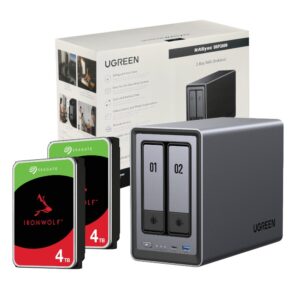 2 bays · HDD
UGreen NASync DXP2800 2 Bay NAS with Seagate Ironwolf NAS 8TB SATA Hard Drive Bundle (2x 4TB)
 2 bays · HDD
UGREEN NASync DXP2800 2 Bay NAS
 4 bays · HDD
UGreen DH4300 PLUS 4-Bay NAS Storage
 4 bays · HDD
UGREEN NASync DXP4800 Plus 4-Bay NAS
 4 bays · SSD
UGREEN NASync DXP480T Plus 4-Bay NAS
 6 bays · HDD
UGREEN NASync DXP6800 Pro 6-Bay NAS
 8 bays · HDD
UGREEN NASync DXP8800 Plus 8-Bay NAS
A little RAID clarity.
What happens if I mix drive sizes?
For the standard RAID layouts here, member drives contribute up to the capacity of the smallest drive. Basic volumes and JBOD can use the individual drive sizes. This calculator does not model SHR or other flexible storage systems.
Does RAID protect against everything?
No. Mirroring or parity can keep an array working through certain drive failures. Keep a separate backup for accidental deletion, damaged files, theft or a problem affecting the NAS itself.
How many drives do I need?
Basic and JBOD start at one drive. RAID 0 and RAID 1 need at least two, RAID 5 needs three, and RAID 6 needs four. RAID 10 needs four or more drives in an even number.
Can RAID 10 survive more than one failed drive?
It can survive one failure in each mirror pair. Losing both drives in the same pair can lose the array, so it does not guarantee survival of any two drive failures.
Let’s plan your storage.
Tell us what you need to store and we’ll help you choose a NAS, drives and backup plan.